6 Landsat Collection 2 SR ST Data Product
The lakeSR data product is a set of tabular datasets, representing the Landsat surface reflectance and surface temperarture data summarized for the point of inaccessibility location which is meant to represent conditions at a given waterbody at a location far from shore (identified by its NHD unique identifier, see Section 3). This data product contains “full stacks” of the Landsat Collection 2 record - that is, all summarized Landsat data available within GEE (through 2024-12-31) from all Landsat missions that met our within-image QA criteria.
The siteSR data product is similar, but is acquired at unique sampling locations as described in 3.2.
6.1 Changes from AquaSat v1 and LimnoSat-US
While much of the general architecture from the previous data products remained unchanged, in AquaMatch we have added a number of features to the remote sensing acquisition workflow, have increased efficiency of the data pull, and have made the acquired data more robust through additional masking. The bullets below summarize the changes implemented in this update. Code below is pulled from the Python scripts that acquire the Landsat data from Google Earth Engine. Software settings are listed in Section 4.
using .yaml file for configuration of the workflow. This allows for greater flexibility in data acquisition including the use of custom configurations for the pull.
assuring location and buffer area are completely contained in a path-row prior to pulling the data. This reduces erroneous counts of pixels for locations and buffers that are at the edge of a path-row, assuring that the buffer distance and included area is consistent per location if it is in the area of path-row overlap.
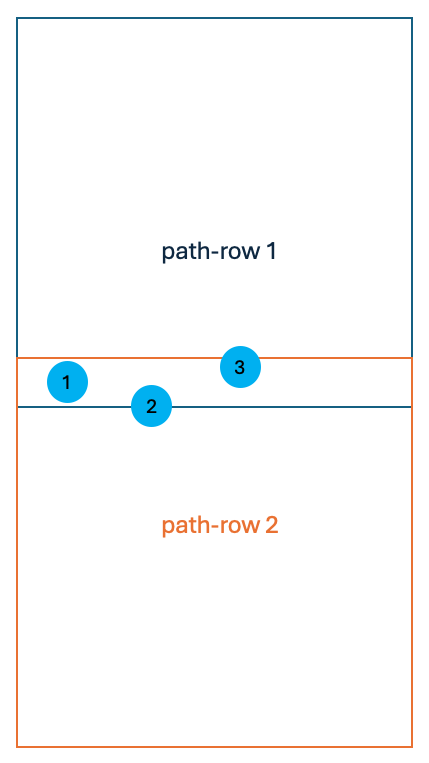
inclusion of Landsat 4 and Landsat 9. At the time of AquaSat v1 and LimnoSat-US, Landsat 4 was not easily integrated with other Landsat missions due to data storage differences. Collection 2 updates allowed for easier interoperability of the TM sensor (Landsat 4) image series and have therefore been included in the update. Additionally, Landsat 9 came online in 2021, and has been added to the data product.
Landsat Collection 2 offers a Surface Temperature product derived from the thermal band. In AquaMatch, we include data from this band. See Section 5.4 for additional considerations in use of these data.
sending tasks to GEE explicitly per path-row and limiting the Landsat stack to the explicit path-row to eliminate duplicate acquisitions. In the previous products, duplicate location/path-row data were acquired because the extracted Landsat stack was not limited to the explicit WRS-2 path-row that the point and buffer were in. This meant that locations that were in a path-row overlap would be extracted twice in two different WRS-2 path-row extents. The code below is an example of this type of filtering that occurs per mission as we run a path-row extraction, where we once clipped the stack to the AOI of the path-row instead of filtering for the path-row itself. Example below is from code at line 1850 in the file
b_pull_Landsat_SRST_poi/py/run_GEE_per_pathrow.pywithin the lakeSR repository.# separate the path-row into path and row values wrs_pathrow = "013031" w_p = int(str(wrs_pathrow)[:3]) w_r = int(str(wrs_pathrow)[-3:]) # filter the Landsat 7 Collection 2 Tier 1 Level 2 product for the path, row, and valid dates l7 = (ee.ImageCollection("LANDSAT/LE07/C02/T1_L2") .filter(ee.Filter.eq("WRS_PATH", w_p)) .filter(ee.Filter.eq("WRS_ROW", w_r)) .filterDate('1999-05-28', '2019-12-31'))filtering for valid mission dates at Landsat stack step. As seen in the code chunk above, we also filter for the valid mission dates as detailed in Section 5.2 - in the previous version this was completed after the Landsat stack was acquired.
implementation of Collection 2 updates, specifically scaling changes and updated QA band conventions. The updated scaling factor function is as follows as directed by the US Geological Survey (2021) and US Geological Survey (2024) documents. Code below from the file
b_pull_Landsat_SRST_poi/py/run_GEE_per_pathrow.pyin the lakeSR repository.def apply_scale_factors(image): """ Applies scaling factors for Landsat Collection 2 surface reflectance and surface temperature products Args: image: one ee.Image of an ee.ImageCollection Returns: ee.Image with band values overwritten by scaling factors """ opticalBands = image.select('SR_B.').multiply(0.0000275).add(-0.2) thermalBands = image.select('ST_B.*').multiply(0.00341802).add(149.0) return (image .addBands(opticalBands, None, True) .addBands(thermalBands, None, True))masking changes. Many updates were made to assure high quality data through the use of updated masking procedures. The masks are detailed below in Section 6.3.1. The cloud mask was also updated to include all sources of contamination (including cloud shadow and dilated clouds) in addition to clouds, snow, and ice. The proportion of pixels within the location buffer that were masked out due to clouds is now tracked as
prop_cloudsas an additional method of QA handling downstream of the GEE extraction.Dynamic Surface Water Extent (DSWE)-like implementation for water detection. We have moved from using the JRC Global Surface Water Mapping Layers Pekel et al. (2016) to using a modified DSWE algorithm based on the USGS implementation of DSWE described in Landsat Satellites Data System (LSDS) document number 2042 version 3 (US Geological Survey 2023a). See Section 6.3.2 for details.
removing no-data acquisitions before GEE export. In AquaMatch, we remove any rows from the summarized GEE product containing no data before export. This adds efficiency to the pull by removing those rows before export, which is a source of added time in the GEE bottleneck.
checking for failed tasks in GEE. For AquaMatch, a failed task would indicate that a path-row acquisition had an error and was not completed within GEE. If a task fails (e.g. has an error when running), the task will be documented within the workflow in the file
b_pull_Landsat_SRST_poi/out/GEE_failed_tasks_vRUN_DATE.txt, where “RUN_DATE” is the date noted in theGEE_config.ymlfile. While this rarely occurs, without checking the task history in GEE a user would not know if there were path-row acquisitions that failed.
6.2 Overview of Acquisition Steps
The workflow for data acquisition from GEE for lakeSR and siteSR is as follows and is automated within the lakeSR and siteSR workflows:
read in and format the yaml configuration file (
b_pull_Landsat_SRST_poi/config_files/config_poi.ymlfor lakeSR orgee_config.ymlfor siteSR) for the GEE runreformat the locations file declared within the configuration file for the GEE run
determine the WRS-2 path-rows that intersect with the locations contained within the locations file
filter the locations (with their buffer that is declared in the configuration file applied) for those that are completely contained by WRS-2 path-rows
iteratively run the GEE script (
run_GEE_per_pathrow.py) per WRS-2 path-row to extract remote sensing data from Google Earth Engine for the locations contained in that pathrowcheck to see that all tasks are complete in GEE before moving to next step
check to see if any tasks failed in GEE extraction which is not visible from the RStudio IDE
6.2.1 Creating a Custom Configuration File
lakeSR and siteSR can be modified to be run by a user by setting up a new config
file and altering the {targets} workflow to point to that config file. To
configure a new run of this workflow, fill out the yaml file at the file path
b_pull_Landsat_SRST_poi/config_files/config.yml for lakeSR and
gee_config.yml for siteSR. To run the pipeline with this custom configuration,
follow the steps in run_targets.Rmd, which will assure proper set up and run
the pipeline.
If you wish to make changes to any processes that are not indicated in the config file (using a different set of lakes/source files, remote sensing masking procedures, summary statistics, QAQC filtering, mission handoff corrections, etc.) we encourage you to do so. Just remember, this pipeline takes days to run due to the bottleneck when submitting tasks to GEE. If you wish to extract remote sensing data for specific locations in a lake, we encourage you to look to our siteSR data product which is more suited to extracting data of that nature. Please note, calculating hand-off coefficients from small numbers of lakes may not provide robust enough summary statistics for intermission comparison and timeseries analysis. See Section 8 for additional guidance.
6.3 Technical Implementation of GEE Acquisition Script
In order to cue Python scripts and map along WRS-2 path-rows within the
{targets} architecture, we use a function run_GEE_per_pathrow() which writes
the current WRS-2 path-row to a text file, then sources a python script that
uses that text file to run the acquisition for the path-row. Additional details
are provided below to describe the steps in the python script
(run_GEE_per_pathrow.py).
6.3.1 Custom Earth Engine Masking Functions
The first section of run_GEE_per_pathrow.py saves custom functions used in the
Landsat stack acquisition. These include data manipulation to create Earth
Engine (EE) objects, custom QA masks, DSWE algorithm, and the functions that
perform the masking and extraction of data from the Landsat image. Below is an
overview of some of the custom masking procedures and their justification, if
applicable. We use the most aggressive masking procedures in the lakeSR and
siteSR products in order to attempt to have consistent and robust data across
such a large area of data acquisition. An interactive masking viewer is
available for select scenes for Landsat
4/5/7
and Landsat
8/9
to see some of the masks in action. In the descriptions below, “optical band” is
used to describe any non-thermal band.
apply_rad_mask: Masks out all pixels that are radiometrically saturated in any optical band using the QA_RADSAT (radiometric saturation quality assessment) band. The Landsat User Guides (US Geological Survey 2021, 2024) note that radiometrically saturated data are “unusable”. Saturated bands happen infrequently in Landsat 8 and 9, but we still apply this mask to all Landsat mission data for continuity.add_cf_mask: Adds a mask band for any pixels obstructed by clouds and snow/ice using the CLOUD_QA (cloud quality assessment) band. This is a general QA band that describes clouds/snow/ice detected by algorithms defined by the atmospheric processing procedure. We have elected to only include pixels that do not contain clouds, cloud shadows, dispersed clouds, or snow/ice as defined by this band. In particular, we follow the suggestions in the product User Guide (US Geological Survey 2021, 2024)Users are advised to engage the QA “Dilated Cloud” (bit 1) AND “Cloud” (bit 3) OFF condition to correctly identify clear pixels over water.
add_sr_aero_mask: Adds a mask band for any pixels in Landsat 8 and 9 that have “medium” or “high” aerosol QA flags from the SR_QA_AEROSOL (aerosol surface reflectance quality assurance) band. Because water is particularly difficult to assess from space, we are more aggressive in this mask than suggested by the Landsat 8 and 9 User Guide (US Geological Survey 2024) which states: “Note that pixels classified as high aerosol content are not recommended for use.”add_opac_mask: Adds a mask band to remove pixels where atmospheric opacity is greater than 0.3 in Landsat 4, 5, and 7 using the SR_ATMOS_OPACITY (surface reflectance product atmospheric opacity) band. For similar reasons as a more aggressive aerosol mask in Landsat 8 & 9, we use this mask in addition to the cloud mask (apply_cf_maskfunction). The Landsat 4-7 User Guide (US Geological Survey 2021) states the following about the atmospheric opacity values:A general interpretation of atmospheric opacity is that values less than 0.1 are clear, 0.1-0.3 are average, and values greater than 0.3 indicate haze or other cloud situations. SR values from pixels with high atmospheric opacity will be less reliable, especially under high solar zenith angle conditions.
apply_fill_mask_457andapply_fill_mask_89: Adds a mask band where any band value is 0 before applying scaling factors to bands. Filled values are infrequent; however, when acquiring data across such a large area and time they are bound to happen.add_realistic_mask_457andadd_realistic_mask_89: Adds a mask band where any band is less than -0.01 after scaling, indicating overcorrection of SR product. While the stated minimum value of the “valid range” for the SR product is 7273 prior to application of scaling factors (0.0000075 after scaling), we know that the Level-2 Surface Reflectance product has been fine-tuned on terrestrial data and small over-corrections of surface reflectance, especially over dark surfaces, are likely to happen. We explicitly allow for very small negative reflectance values to be sure we do not remove very deep, oligotrophic and/or high DOC water systems from our data set while implementing this QA filter.add_glint_mask: Adds a mask band where any optical band is > 0.2, indicating likely sun glint artifacts.
6.3.2 Defining water area
We use an adapted version of the DSWE algorithm to define what pixels are water
within the buffer of our specific locations (also implemented in
run_GEE_per_pathrow.py). DSWE was defined in Jones (2019) for Landsat Collection
1 and re-implemented for Collection 2 as a Level-3 data product in
US Geological Survey (2023a). Differences between the Level-3 implementation and the
on-the-fly calculation made within our workflow are as follows:
we use the Level 2 SR product instead of the Level 2 Analysis Ready Data Product to calculate DSWE threshold values
we mask any DSWE values that are not fully illuminated (a value of 0 in the function below) as defined by the
ee.Terrain.hillShadowfunction in Google Earth Engine using the Multi-Error-Removed Improved-Terrain Digital Elevation Model (MERIT DEM) version 1.0.3 (Yamazaki et al. 2017) at an extent of 3000 meters surrounding a given point for analysis.def calc_hill_shadows(image, geo): """ caluclate the hill shadow per pixel Args: image: ee.Image of an ee.ImageCollection geo: geometry of the WRS tile as wrs.geometry() in script Returns: a band named 'hillShadow' where values calculated are the hill shadow per pixel. output 1 where pixels are illumunated and 0 where they are shadowed. """ MergedDEM = ee.Image("MERIT/DEM/v1_0_3").clip(geo.buffer(3000)) hillShadow = ee.Terrain.hillShadow(MergedDEM, ee.Number(image.get('SUN_AZIMUTH')), ee.Number(90).subtract(image.get('SUN_ELEVATION')), 30) hillShadow = hillShadow.rename(['hillShadow']) return hillShadowThis is different from the implementation described in the Level 3 data product which uses a set of hillshade and landcover thresholds to determine whether or not the resulting DSWE value should be masked. Based on visual inspection, our adaptation seems to label pixels as expected.
Our implementation of the DSWE algorithm results in the following values per pixel based on the thresholds described in US Geological Survey (2023a) table 2.2 and 2.3
a value of 0 indicates no water/fill
1 is confident water
2 is low confidence water
3 is high confidence partial water (or vegetated water)
4 is low confidence partial water
Within the scope of lakeSR and siteSR, we tabulate pixels that are a DSWE value
of 1 (“DSWE1”) for high confidence open water, or what we call “DSWE1a”
- high confidence open water OR the pixel meets a threshold that may indicate
there is surface-level algae. Like the QA masks, the DSWE implementation occurs
in the Python script run_GEE_per_pathrow.py. The algae mask is defined as when
a pixel has a DSWE value greater than 1 and the green band scaled value is
greater than 0.05 and the red band scaled value is less than 0.04. These values
are based on optical properties intended to mimic the spectral response of
chlorophyll a as described by Burket et al. (2023). This is an experimental mask, so we
export both DSWE1 and DSWE1a summaries within lakeSR. We have found some
omission error within DSWE1 for visible floating scum within river systems and
this additional mask captures many of those pixels without adding unnecessary
uncertainty. Users of the lakeSR and siteSR data products can choose to use the
DSWE1a product if applicable to their research, however, this threshold was
defined in the Illinois and Ohio Rivers and may not be applicable in all
environments.
6.4 Additional diagnostic data columns
During the masking and flagging step of the workflow, we tally pixels that met
certain criteria for use as diagnostic tools, which are stored in the same file
as the summary remote sensing data. This includes tallying of varying DSWE types
(greater than 0 – water of some kind with any confidence pCount_dswe_gt0, 1
high confidence water pCount_dswe1, 1a high confidence water with positive
algal mask pCount_dswe1a, 3 high confidence vegetated water pCount_dswe3)
within the buffered area. These tallies are of any pixel that meets the DSWE
category and met the hillshade, cloud, opacity/aerosol, realistic, and glint
thresholds within the set buffer. Columns for the proportion of pixels masked by
clouds prop_clouds and shaded by terrain prop_hillShadow are also provided,
no additive mask is used when tallying these pixels so the value represents the
proportion of pixels masked from the data summary in the buffered area. These
tallies are meant to be used as diagnostic tools for further quality control and
modeling purposes, though we do not have recommended uses at this time.
See the formal metadata for definitions of these flags, which are stored
alongside the remote sensing summaries in the lakeSR and siteSR output files
(stored as one feather file per Landsat mission, e.g.
lakeSR_Landsat9_DSWE1_2025-06-04.feather,
siteSR_Landsat4_DSWE1_2025-06-06.feather).
6.5 Payload handling
Because GEE is a free service to those at academic or governmental institutions,
there are limits to the total number of tasks being run co-currently on GEE’s
platform. For this reason, tasks are sent to GEE as path-row groups as soon as
there are fewer than 10 tasks in the GEE tasks queue. Additionally, any path-row
containing more than 5,000 POI locations are sent as separate tasks in 5000
location chunks. This is an additional step that is taken in addition to
processing per path-row to avoid failed tasks. This management is orchestrated
within the run_GEE_per_pathrow.py script and through integration with
{targets} which runs this script per WRS-2 pathrow.
We have also implemented a status check for tasks sent to GEE to determine if
any have failed (Python script check_for_failed_tasks.py), as once the tasks
are sent from the RStudio IDE, you can not tell whether or not they have
completed or failed without (a) manually looking at the tasks list or (b)
programatically checking the task list. This stores a text file at the filepath
b_pull_Landsat_SRST_poi/out/GEE_task_errors_vRUN_DATE.csv containing the names
of the tasks that have failed. If no tasks have failed, no file will be present.
Generally speaking, failed tasks would indicate an error within the GEE
acquisition script, usually due to changes in the
b_pull_Landsat_SRST_poi/py/run_GEE_per_pathrow.py script. We recommend
checking the task status of the GEE run at
https://code.earthengine.google.com/tasks after any changes to the GEE
functions file, which will indicate if tasks are failing due to code error
without waiting for the total completion of the GEE target.